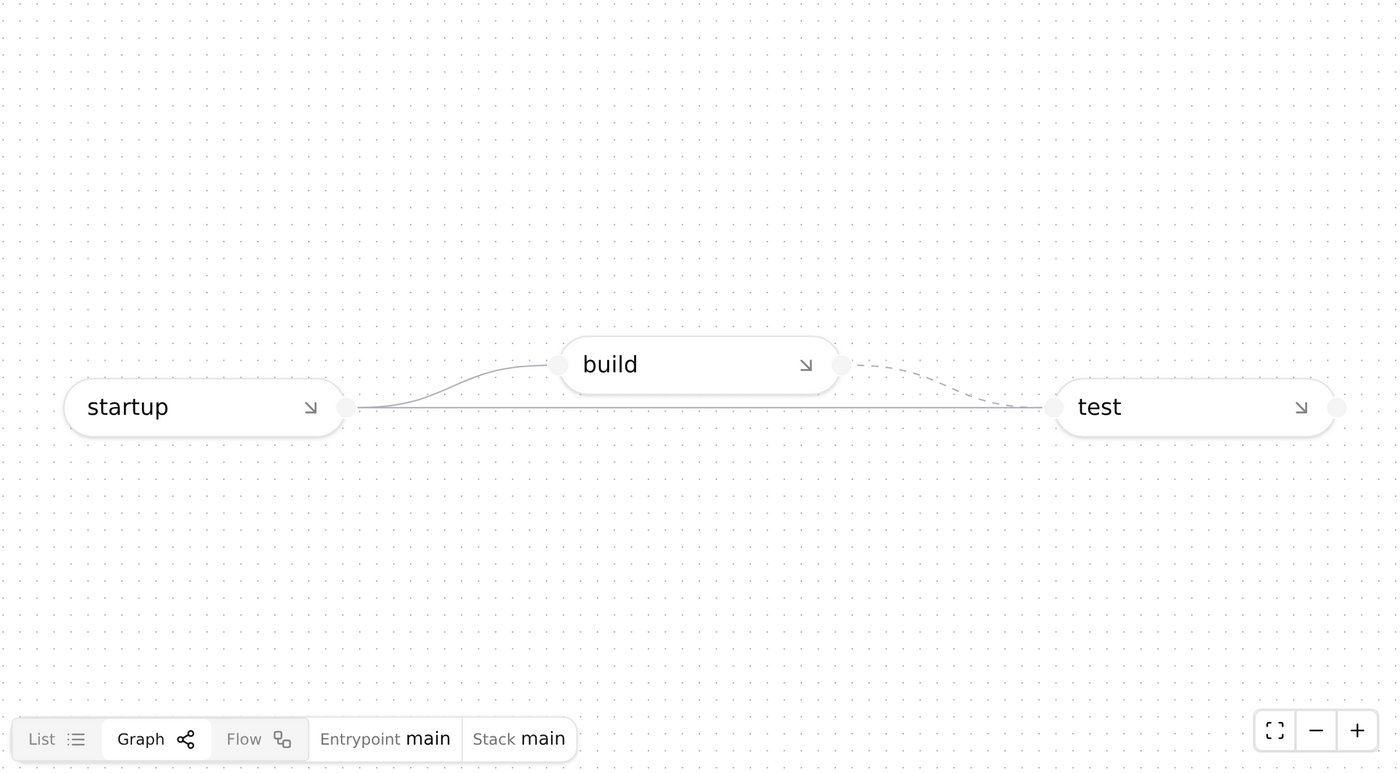
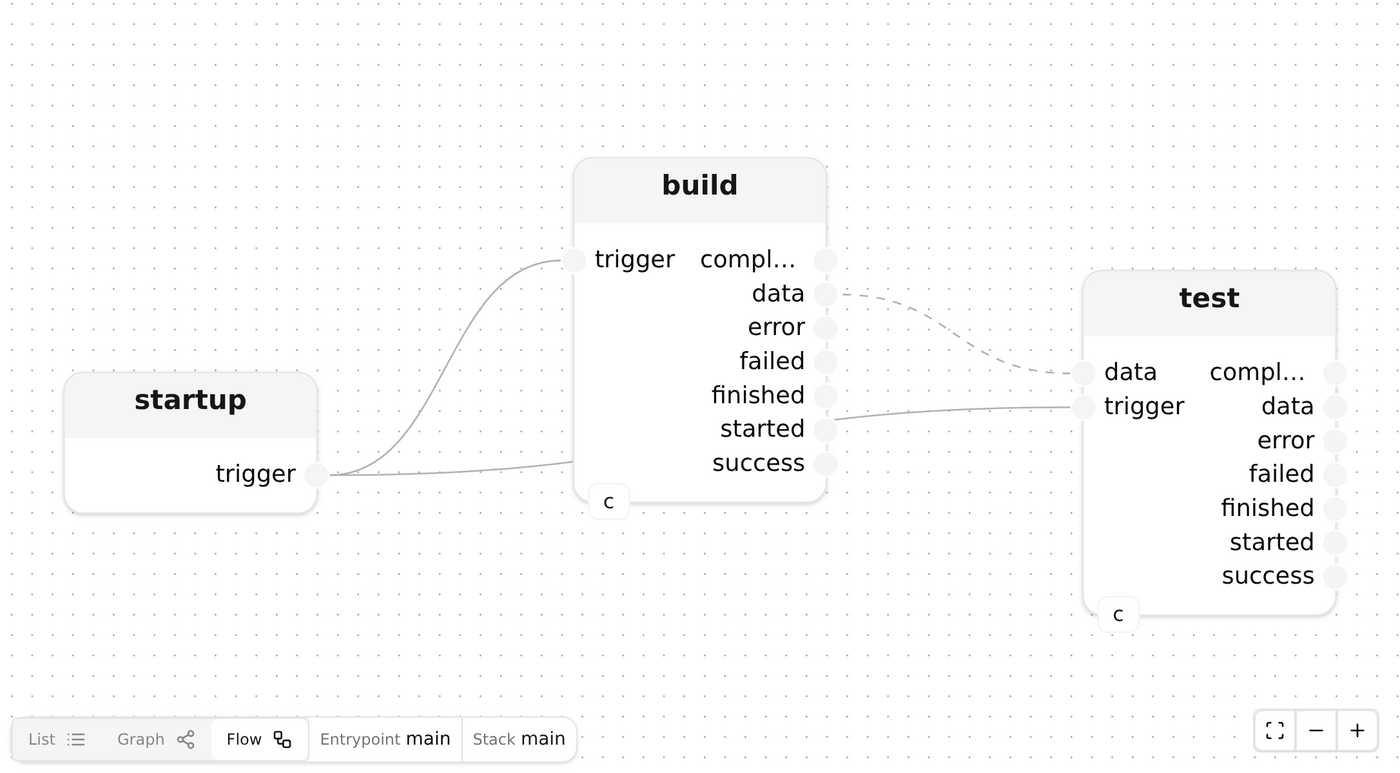
DocsFrom TemplateCI/CD TemplateCI/CD Template Cadence.CI relies on the Mélodium technology to provide powerful and efficient service. This tutorial explains how to create a detailed CI/CD with Mélodium. For CI/CD within existing services, Github and GitLab integrations are explained in next sections. Note You need Mélodium version 0.10.0 or greater to be installed. Create a Mélodium CI/CD project At the root of git repository, run command melodium new --template cicd --path .melodium-ci cicd. A folder .melodium-ci/ is now created, containing the base code for a working CI. In this folder are three files: Compo.toml lib-root.mel advanced.mel The Compo.toml file contains the configuration of the CI/CD program. lib-root.mel contains the CI/CD program itself, and advanced.mel the same program but implemented in an advanced way (ignored in this page, see Advanced Implementation). Within lib-root.mel is the main treatment, that is designated as the main entrypoint by the base configuration. There is no requirement for a program to have such a main entrypoint, different ones may be used for different modes of works. The main treatment contains all the base elements to make the CI/CD working: some parameters to manage data exchange outside of the CI/CD process, a CicdDispatchEngine to manage work dispatch among different services and runners, treatments such as startup, build, and test. startup treatment is provided by the Mélodium standard library to trigger anything from the very beginning of the program. CI/CD Implementation The build and test treatments are based on simpleStep and simpleStepWithInput. Both takes the CicdDispatchEngine model, and an input trigger signal. build: simpleStep[cicd=cicd]( name="build", image="ubuntu:noble", commands=|raw_commands([ "apt-get update", "apt-get install -y git", "git config --global url.https://.insteadOf git://", |format("git clone --branch {repository_clone_ref} --depth 1 {repository_clone_url} project", |map([ |entry("repository_clone_ref", repository_clone_ref), |entry("repository_clone_url", repository_clone_url) ]) ), "sh -c \"cd project/ ; ls -l --almost-all | tee files-list.txt\"", "mv project/files-list.txt /mnt/data/" ]), out_file="files-list.txt" ) test: simpleStepWithInput[cicd=cicd]( name="test", image="alpine", in_file="list.txt", commands=[ |command("test", ["-s", "/mnt/data/list.txt"]), |command("cat", ["/mnt/data/list.txt"]) ] ) They both take some parameters: name, a string naming the step itself, used in logs and reports; image, the container image to use; pull_secret, the (optional) secret to use to pull the container image; commands, the list of commands to run; out_file, the (optional) file to stream as output data. Few parameters are available to configure more precisely a step: memory, memory (in mebibytes) dedicated to container; cpu, amount of CPUs (in millicores); storage, disk space (in mebibytes) at disposal; arch, designating the hardware architecture on which the step must run (default is ARM64). Currently the AMD64/x86_64 |amd64() and ARM64/aarch64 |arm64() architectures are supported. Processing commands The commands parameter is a list of commands run on container. Commands can be specified in multiple ways: |command() function, for a finely-detailed command and list of arguments; |raw_command() function, for a raw string command; |raw_commands() function, for full list of string commands. Triggering and Connecting Steps The simpleStep and simpleStepWithInput both provides inputs and outputs: input trigger, to instanciate container and start the processing; output started, to signal when commands starts to run; output completed, to signal successful completion of step; output failed, to signal failure of step; output finished, to signal step is finished, whatever it were successful or not; output data, streaming data from file given in out_file. Also, the simpleStepWithInput provides an input data to write file in_file within container before running commands. startup.trigger -> build.trigger,data -> test.data startup.trigger -----------------------> test.trigger About Dispatch and Distribution Mélodium dispatch the work among workers located on different containers and machines, depending on the given requirements. The same unique CI/CD program can run across multiple processes and machines and allows precise synchronization and schedule among heterogenous systems. A CicdDispatchEngine can be configured to dispatch work through cloud API or locally using container composition, independently from where the initial process in running. The location parameter specifies what dispatching method is to use, with either "api" (the default) or "compose" values, respectively sending dispatch runner requests to the API or spawning it using Podman Compose or Docker Compose. In the case of container composition, requirements satisfaction is subject to machine abilities, especially architecture and total available memory. Note "compose" distribution can be used in CI/CD services like Github Actions and GitLab CI to make full use of provided runners without relying on additional external runners. Execute CI/CD Locally with Remote Distribution In order to run the CI/CD program, invoke Mélodium with program parameters. melodium .melodium-ci/Compo.toml --api_token <YOUR_RUN_API_TOKEN> --output_directory /your/output/directory --repository_clone_url <FULL_CLONE_URL>.git --repository_clone_ref <BRANCH_OR_TAG> Where YOUR_RUN_API_TOKEN is a Cadence.CI Run Token. This is executing the CI/CD “main engine” from local computer and distributing the work on distant workers. All the CI/CD logs are shown in terminal, and data wrote under /your/output/directory. Execute CI/CD Locally with Local Distribution If Podman Compose or Docker Compose is installed locally, it is possible to launch the CI/CD with local distribution: melodium .melodium-ci/Compo.toml --work_location compose --api_token <YOUR_RUN_API_TOKEN> --output_directory /your/output/directory --repository_clone_url <FULL_CLONE_URL>.git --repository_clone_ref <BRANCH_OR_TAG> Be aware that the CI/CD is then constrained to host machine abilities, especially in terms of memory and architecture. Note Container Runtime service must be running. This is the default with Docker. On Podman, the podman service should be launched (i.e. podman system service --time 0 unix:///run/user/1000/podman/podman.sock). Execute CI/CD on Service CI/CD is executable on any service able to run Mélodium. Most common ones are Github and GitLab, for which detailed procedures are given in next sections.Build a CI/CD PipelineAdvanced Implementation