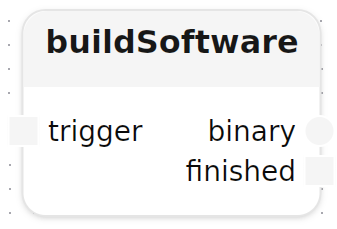
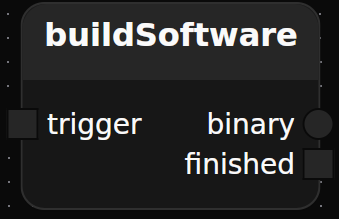
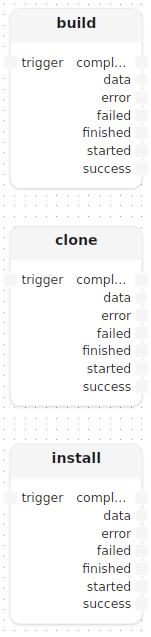
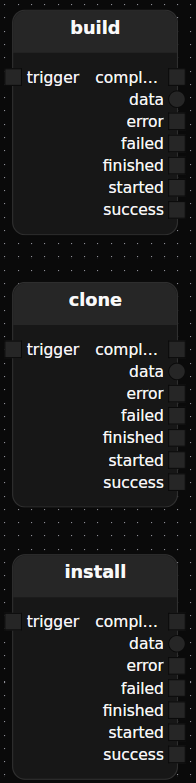
DocsFrom ScratchBuild a CI/CD PipelineBuild a CI/CD Pipeline This guide walks through building a CI/CD pipeline from scratch using Cadence.CI and the Mélodium language. By the end, you will have a working pipeline that clones a repository, compiles a binary, and streams the result back to your local machine. Note You need Mélodium version 0.10.0 or greater installed. For a deeper introduction to the Mélodium language, see the Mélodium Language Book . Create the Project Start by scaffolding a new Mélodium program: melodium new my_cicd Then open my_cicd/Compo.toml and add the following dependencies: [dependencies] std = "0.10.0" cicd = "0.10.0" fs = "0.10.0" process = "0.10.0" work = "0.10.0" These packages provide the standard library, CI/CD runner primitives, filesystem access, process management, and resource definitions. Define the Treatment A treatment in Mélodium is a named unit of work with typed inputs, outputs, and dependencies. Open my_cicd/lib-root.mel and declare the buildSoftware treatment: use cicd/runners::CicdDispatchEngine use cicd/runners::CicdRunnerEngine treatment buildSoftware[cicd: CicdDispatchEngine]() input trigger: Block<void> output finished: Block<void> output binary: Stream<byte> model runner: CicdRunnerEngine() { } Breaking down the signature: [cicd: CicdDispatchEngine], the dispatcher model that manages runner provisioning (docs ). input trigger: Block<void>, a signal that starts the build. output finished: Block<void>, a signal emitted when the build completes. output binary: Stream<byte>, a typed byte stream carrying the compiled binary. model runner: CicdRunnerEngine(), the runner model this treatment will use (docs ). Define the Steps Inside the treatment body, declare three steps that will run sequentially on the runner: installing tools, cloning the repository, and building the binary. use cicd/steps::stepOn use process/command::|raw_commands /* … */ install: stepOn[runner=runner]( name="install", executor_name="ubuntu", commands=|raw_commands([ "apt-get update", "apt-get install -y gcc" ]) ) clone: stepOn[runner=runner]( name="clone", executor_name="ubuntu", commands=|raw_commands([ "git clone https://github.com/niwasawa/c-hello-world.git" ]) ) build: stepOn[runner=runner]( name="build", executor_name="ubuntu", commands=|raw_commands([ "gcc c-hello-world/hello.c", "mv a.out /mnt/data/executable" ]), out_filesystem="data", out_file="executable" ) All three steps run on the executor named "ubuntu" from runner. The build step additionally streams the compiled file back via the out_file parameter, see stepOn documentation for the full reference. Connect the Steps Steps are connected by declaring data flows between their inputs and outputs. The install and clone steps can run in parallel; build waits for both to complete before starting. use std/flow::waitBlock /* … */ awaitPrepare: waitBlock<void>() install.success -> awaitPrepare.a clone.success ---> awaitPrepare.b awaitPrepare.awaited -> build.trigger,finished -> Self.finished build.data -------------> Self.binary waitBlock is a synchronization primitive that emits awaited only after both a and b have received a value. Once build completes, finished and binary are forwarded to the treatment’s own outputs. Provision the Runner The steps above run on a runner, but the runner itself must be set up and torn down within the treatment. Add setupRunner and stopRunner calls and connect them to the step lifecycle: use cicd/runners::setupRunner use cicd/runners::stopRunner use work/resources/arch::|amd64 use work/resources::|container use work/resources::|mount use work/resources::|volume /* … */ setupRunner[dispatcher=cicd, runner=runner]( cpu=200, memory=100, storage=100, name="builder", volumes=[|volume("data", 30)], containers=[|container("ubuntu", 1000, 1000, 1000, |amd64(), [|mount("data", "/mnt/data")], "ubuntu:latest", _)] ) stopRunner[runner=runner]() Self.trigger -> setupRunner.trigger,ready -> install.trigger setupRunner.ready ---------> clone.trigger build.finished -> stopRunner.trigger The runner is started when the treatment is triggered, install and clone start as soon as it is ready, and stopRunner is called after build finishes. The runner is never idle longer than necessary. Full Treatment Putting it all together: use cicd/runners::CicdDispatchEngine use cicd/runners::CicdRunnerEngine use cicd/runners::setupRunner use cicd/runners::stopRunner use cicd/steps::stepOn use process/command::|raw_commands use std/flow::waitBlock use work/resources/arch::|amd64 use work/resources::|container use work/resources::|mount use work/resources::|volume treatment buildSoftware[cicd: CicdDispatchEngine]() input trigger: Block<void> output finished: Block<void> output binary: Stream<byte> model runner: CicdRunnerEngine() { setupRunner[dispatcher=cicd, runner=runner]( cpu=200, memory=100, storage=100, name="builder", volumes=[|volume("data", 30)], containers=[|container("ubuntu", 1000, 1000, 1000, |amd64(), [|mount("data", "/mnt/data")], "ubuntu:latest", _)] ) stopRunner[runner=runner]() Self.trigger -> setupRunner.trigger,ready -> install.trigger setupRunner.ready ---------> clone.trigger build.finished -> stopRunner.trigger install: stepOn[runner=runner]( name="install", executor_name="ubuntu", commands=|raw_commands([ "apt-get update", "apt-get install -y gcc" ]) ) clone: stepOn[runner=runner]( name="clone", executor_name="ubuntu", commands=|raw_commands([ "git clone https://github.com/niwasawa/c-hello-world.git" ]) ) build: stepOn[runner=runner]( name="build", executor_name="ubuntu", commands=|raw_commands([ "gcc c-hello-world/hello.c", "mv a.out /mnt/data/executable" ]), out_filesystem="data", out_file="executable" ) awaitPrepare: waitBlock<void>() install.success -> awaitPrepare.a clone.success ---> awaitPrepare.b awaitPrepare.awaited -> build.trigger,finished -> Self.finished build.data -------------> Self.binary } Create the Entrypoint A treatment cannot be run directly, it needs an entrypoint that wires it to the outside world. Add a runBuild treatment to my_cicd/lib-root.mel: use fs/local::writeLocal use std/engine/util::startup treatment runBuild(var output_file: string = "./executable") model cicd: CicdDispatchEngine(location="compose", api_token="") { startup() buildSoftware[cicd=cicd]() writeLocal(path=output_file) startup.trigger -> buildSoftware.trigger,binary -> writeLocal.data } Then declare it as the program’s entrypoint in my_cicd/Compo.toml: [entrypoints] main = "my_cicd::runBuild" Run melodium my_cicd/Compo.toml A file named executable will appear in the current directory once the pipeline completes. Note The CicdDispatchEngine is configured with location="compose" here, which uses Podman Compose or Docker Compose to provision runners locally. For production use with Cadence.CI, set location to your configured cluster and provide the appropriate api_token. See the CicdDispatchEngine documentation. Full Program Download the complete program for reference.Integration with Kubernetes ClustersCI/CD Template