Run Artifacts
Run artifacts keep what a run produced and what you want to find again: a binary, a package, a test report, a page of documentation. They have their own access and retention, a stable address for scripts, and a place in the run page. Steps hand data to each other as streams between engines; artifacts are for what outlives the run.
An artifact is a file, or a tree of up to 1,000 files, named within its run. An artifact with an entrypoint is a render, shown in the run page.
Pushing Artifacts
Programs push artifacts with the work/artifact area of Mélodium, and the steps of the cicd package take artifacts to push once their commands succeed. An artifact is a directory, whose files keep their paths within it, or a single file, from any filesystem the program reaches: the engine’s, or an executor’s volume. A program gives the artifact its name, its access, retention and lock, and its entrypoint when it is a render.
Each file is read, checked and sent to storage at the same time, in parts for large files, with its SHA-256, so an artifact needs no room on the disk beyond its own files, and files of unknown size are fine. A file holding a value the engine revealed from a secret, in its content or its path, is refused, and so is the artifact. The artifact appears once every file is in storage; until then nobody sees it.
Programs also fetch the artifacts of other runs of the organization, every file being checked against its SHA-256 before it is written, and a file that differs being removed.
Names are made of letters, digits, _, . and -, and are unique within a run. A run pushes artifacts when it belongs to an execution group, as every run launched with --api-report and every step it dispatches do.
Access, Retention and Lock
- Access is the artifact’s own, whatever the access of its run.
organizationkeeps it to the members of the organization and its runs;publicopens it to anyone. A private run can share a public artifact, and a public run can keep an artifact to the organization. - Retention is, by default, the one of your plan, with three months at least: 120 days without a plan, five years on Basic and on the open-source plan, ten years on Pro. A program can ask for any number of days, or for no end date. Long retention counts towards the managed storage of your plan, wherever the artifact is kept.
- Lock keeps an artifact for good: nobody deletes it, administrators included, and its expiry only moves later. A locked artifact still expires at its date, if it has one, and its access can still change. Locking can never be undone.
| Administrator | Operator | Member | |
|---|---|---|---|
| List, download, copy addresses | ✓ | ✓ | ✓ |
| Change access and expiry | ✓ | ✓ | |
| See the history | ✓ | ✓ | |
| Lock | ✓ | ||
| Delete an artifact that is not locked | ✓ |
The history of an artifact lists its push and every change of access, expiry or lock, its deletion or expiry, with the member or run behind each change. It stays after the artifact is gone.
Stable Addresses
Every artifact has an address that stays the same for as long as it is kept, public or not:
https://api.melodium.tech/0.1/artifacts/<run>/<name>leads to the file itself for an artifact of one file. For several files, it answers in JSON with the artifact and a download link for each file, valid an hour.https://api.melodium.tech/0.1/artifacts/<run>/<name>/<path>leads to one file.
# A public artifact
curl -L -o app https://api.melodium.tech/0.1/artifacts/<run>/app

# Any artifact, with an artifact token
curl -L -o app -H "Authorization: Bearer $ARTIFACT_TOKEN" https://api.melodium.tech/0.1/artifacts/<run>/app
The address redirects to storage, which serves the bytes, ranges included; the ETag is the file’s SHA-256. An artifact you are not allowed to read answers 404, like one that does not exist, so that a private artifact is never confirmed. Once expired or deleted, it answers 410.
Anyone reads a public artifact. The others are read by the members of the organization, by the runs of the organization with the token of their machine, and by artifact tokens. In a browser, images, PDF files, plain text, JSON, audio and video open in place; every other file downloads, HTML, SVG and scripts included. Renders run on a domain of their own instead.
Artifact Tokens
A deploy script or a package index downloads artifacts with an artifact token, cad_a_... (see Keys), rather than a member’s session. Administrators create them on the Keys page, under Resources, where they are listed; the Get Artifact Token button of the Storage page leads there. A token reads every artifact of the organization, or only those of one run, or whose name starts with a prefix, until a date or until revoked. The token is shown once. It reads the stable addresses and the artifact listings of what it covers, and nothing else. Its last use is recorded, and a token found in a public place is revoked at once.
In the Dashboard
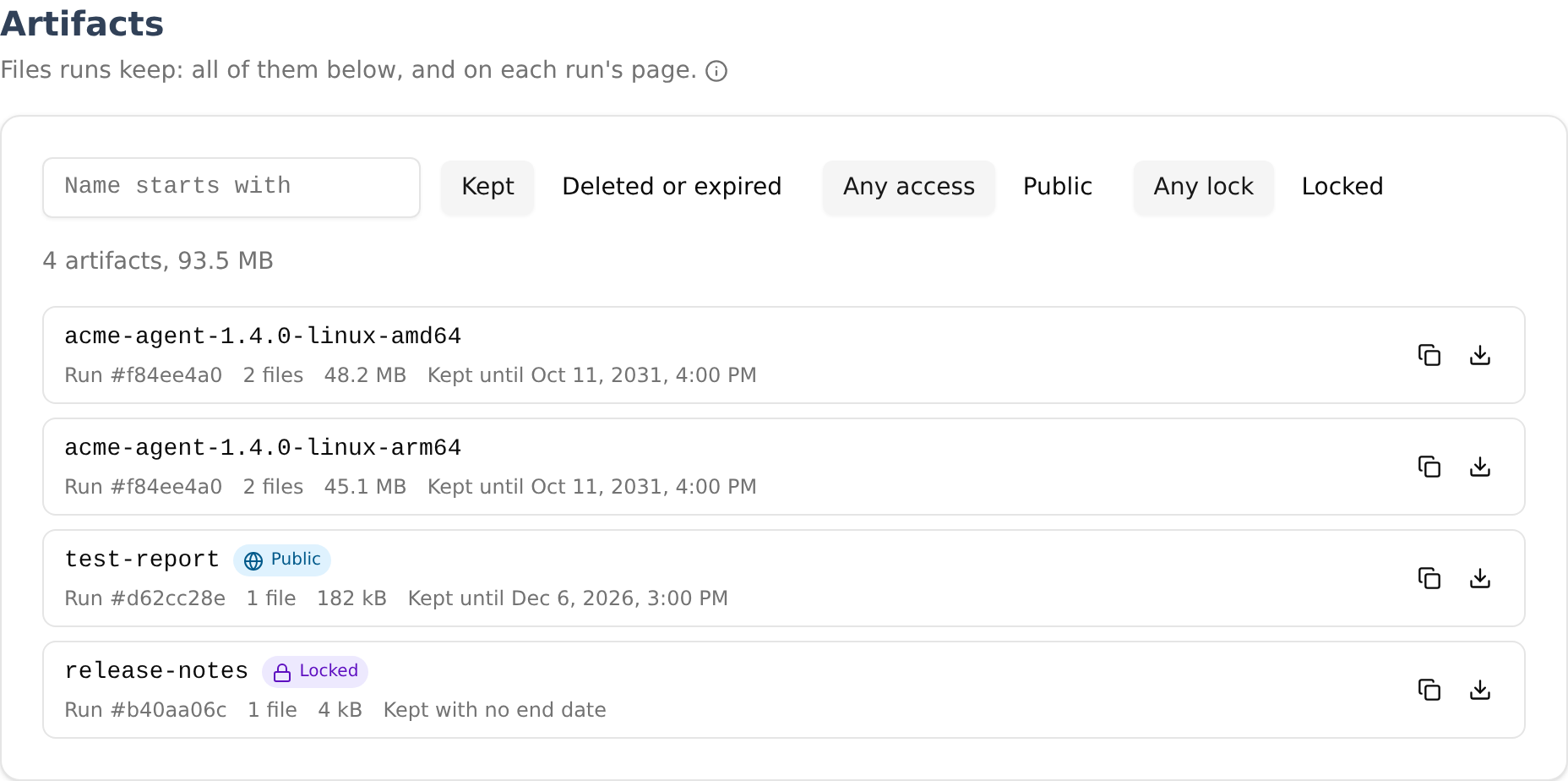
The run page lists the artifacts of the run, with their files, size, access and expiry; the group page lists those of all its runs; public run pages list the public artifacts. The Storage page lists every artifact of the organization, newest first, with their number and total size; it filters them by the start of their name, by access, by lock, and shows the deleted and expired ones on request. Each one downloads in a click: a single file directly, several files as a zip that your browser builds from storage, straight to disk when the browser allows it. Opening an artifact shows its files, its address and the address of each file, the settings of its access and expiry, its history, and where its copies are when you have storage of your own.
The Manifest
An artifact is stored next to the reports of its run, in its own folder: reporting-<group>/<run>/artifacts/<name>/<artifact id>/, its files under files/ at their paths, and a manifest.json. The manifest is written when the artifact is complete, and written again when its access, expiry or lock change. It describes the artifact (name, entrypoint, access, expiry, lock, and the dates, tags, Mélodium version and entrypoint of its run) and every file, with its path, its key in the bucket, its size, its SHA-256 and its media type. A bucket of your own thus describes what it holds by itself, for as long as you keep it.
Going Further
- Renders: showing an artifact in the run page.
- Storage: where artifacts are kept, and copies across buckets.
- Caches.
- The
work/artifactarea of the Mélodium reference.